ProZ.com frequently asked questionsTerminology/term help Main Main
1 - Terminology/term help 2 - KudoZ
2.1 - KudoZ: general 1.1 - What is KudoZ? KudoZ is a community-based terminology network. There are two broad areas: "help" KudoZ and "glossary-building" KudoZ. Both share many elements in common but have different objectives: 1.2 - Glossary of KudoZ terms
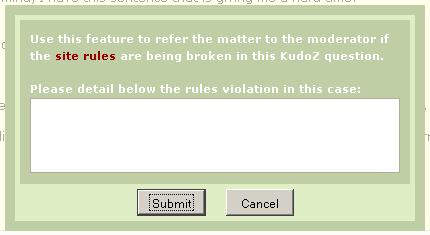
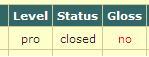
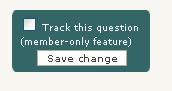
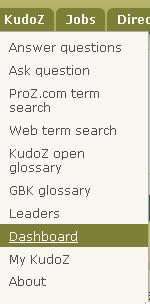
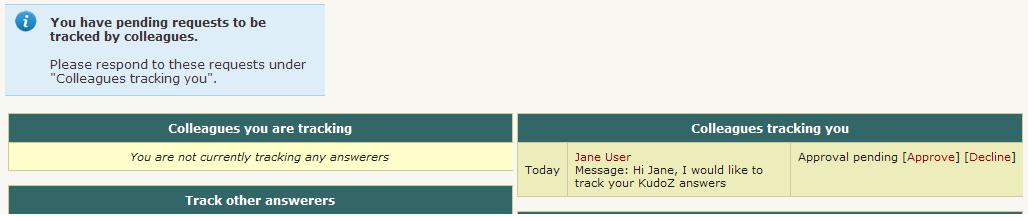
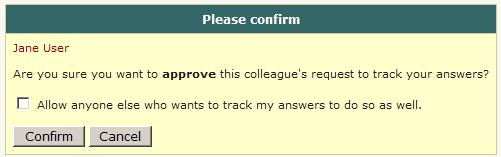
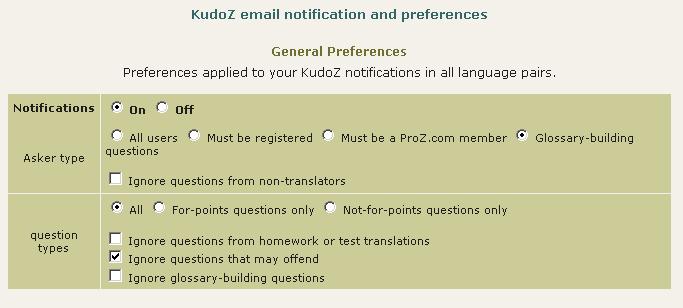
1.3 - How does "help" KudoZ work? A "help" KudoZ 'transaction' involves three steps: 1.4 - What good are KudoZ points? Some clients use KudoZ points to flag translators for further qualification. The logic is that if you require the services of a translator with understanding of medicine, a person who has earned 300 points from medical questions may be a good place to start looking. 1.5 - How are KudoZ points updated? KudoZ point totals shown in some places throughout the site are updated once daily, whereas those in other places are updated in real time. So there can be temporary discrepancies, but correction is made when all points are counted once per day. 1.6 - Do I earn any KudoZ points by answering KudoZ questions? No. KudoZ points are only earned if one of your answer to any KudoZ question is selected by the asker or automatically by the system based on peer agreement. 1.7 - What are the rules of KudoZ participation? See the KudoZ rules: General rules, Rules for asking and Rules for answering and making peer comments 1.8 - Can friends, family members or close associates participate in my KudoZ questions or answers? Participation in KudoZ questions, particularly using the peer comment system to "boost" an answer, or in asking and answering to gain KudoZ points, should not be carried out among the profiles of friends, family or close associates, in order to maintain a certain level of transparency in the KudoZ arena. In cases where interacting profiles are shown to be of this type, a mutual block may be applied to the profiles (this blocks the interaction between specific profiles only, not participation in KudoZ at large) to ensure fairness. 1.9 - What should I do if KudoZ rules are being broken? If you observe KudoZ rules being broken you should refer the matter to the moderator for the language pair in question. A list of moderators is available here. 1.10 - What is the logic behind the KudoZ categories? KudoZ questions can be categorized using a field list with about 100 entries. The list, which was created statistically from subject areas entered in free text by ProZ.com users, is somewhat fuzzy on purpose. For example, because one member might think "auto" while another thinks "cars", both category names are made available in the list. 1.11 - What happens if a "help" question isn't graded? If a "help" question has received answers but not been closed within three days, an email is sent to the asker reminding him or her to grade. If the question remains open after four such reminders have been sent (over 2 weeks), an attempt is made to select the best answer automatically. An 'autograding robot' makes its selection based on the net number of peer 'agrees' received by each answer, according to the following rules: 1.12 - Are askers able to close a question without awarding points? Yes. An asker may choose to do this when s/he has asked a question in error (misspelled term, etc.), when no answer was deemed helpful, when a better term was found elsewhere (and no answer was deemed helpful), or in other cases. 1.13 - How often do askers close questions without awarding points? Less than 5% of the time. 1.14 - Where can I find a list of my previous questions and answers? Go to your profile page and click on the KudoZ tab. Members will also see the option to force an update of their KudoZ points here. 1.15 - Can I see questions in language pairs not reported in my profile? Yes. You can see KudoZ questions in all language pairs by clicking on See more languages in the KudoZ questions page. 1.16 - Under what conditions will a KudoZ question be removed? There are about ten possible reasons why a KudoZ questions would be removed ("squashed"). For a discussion of these reasons, see: this article. 1.17 - What information can I see about a KudoZ asker? If you move your mouse over the asker's picture in a KudoZ question you will see a mouse-over message similar to the one pictured below: 1.18 - What does the "Vote PRO" or "Vote non-PRO" button do? In a "help" KudoZ question marked as PRO, participants may vote to have the question marked as non-PRO, and vice versa. Moderators and KudoZ editors have a single vote, like any other user of the site. 1.19 - When posting my question I selected by mistake the wrong level (PRO, non-PRO). What can I do? You should submit a support request to have this issue addressed by staff. 1.20 - I think my point total should have gone up by more today. If you are a member, it is possible to force the system to update your points in real time. Go to your KudoZ points summary page and click on Update points totals now. If you are a registered user, any discrepancy in your point total is likely to be corrected within 24 hours. 1.21 - One of my KudoZ point totals dropped. How is this possible? It is possible for select point totals (overall, PRO, by field or by period) to go down. Factors that could cause this: 1.22 - How can I change what appears on my KudoZ points summary on my profile page? Users can elect to hide certain types of KudoZ points from their summary from this page: http://www.proz.com/pro/?show_mode=kudoz&sub_mode=summary 1.23 - What do the "ok" and "no" under the the "Gloss" (glossary) column in my KudoZ activity section indicate?
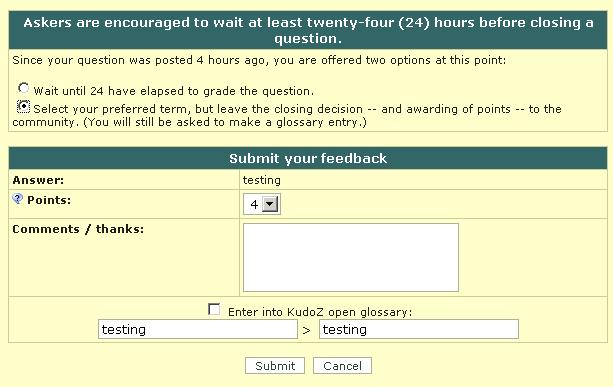
1.24 - I had to create a new profile. Can I merge my points from the previous profile? Yes, if you are a member, support staff can do this for you. Note that not just your points, but your entire KudoZ history (asking, peer comments, notes, etc.) will be merged. You will no longer have access to the old profile. 1.25 - How can I prevent the ProZ.com term search from transliterating diacritics and accented characters? In some cases, the ProZ.com term search provides a limited ability to transliterate diacritics and accented characters (for example, a search for the term "publica" may return results containing "pública" as well). To disable this feature, select the "match exact phrase" option. 1.26 - How can I enter a discussion entry? To enter a discussion entry you should click on the "Post discussion" button. A form will show to allow you to post a title and the body of your entry. These fields are limited to 50 and 1200 characters respectively (there is a counter to tell you how many characters you have left for the main field). There is a preview option and buttons for submitting the entry and for canceling the operation. 1.27 - I suggest requiring payment for participation in KudoZ. This would boost quality. There are not currently any plans to restrict the use of KudoZ to members, or to require additional payment for participation in KudoZ. However, the option is provided to set viewing and notifications preferences in such a way that you only see questions from members. Also, when you ask, it is possible to specify a preference that answerers be members. 1.28 - Are KudoZ questions indexed by search engines? Yes. As with the public forums, KudoZ questions are indexed by search engines. 1.29 - What do the time references next to the confidence level and in the peer section indicate? They indicate the time elapsed from the moment the question was asked until the other action "answer", "peer comment" took place. The times shown are measured in relation to moment the question was asked. 1.30 - Can the asker enter in the glossary a term different from the one suggested in the selected question? Yes. Points are (or should be) given to the most helpful answer, while the best possible term should be entered in the glossary, even if it was not suggested by the answerer who won the points. 1.31 - A user in my sub-community regularly posts bad answers and they are sometimes selected and I am concerned that the glossary will deteriorate. Many valuable colleagues are of the same opinion and several of them have abandoned KudoZ. What can be done? The system includes the "disagree" feature. If answers considered invalid receive several disagrees based on linguistic (not personal) comments, then the amount of "bad" answers is likely to be reduced. 1.32 - I was the first to provide the right answer to a KudoZ question and then other user provided the same answer adding few more explanations and received the points (instead of agreeing to my answer). Is this allowed? Askers have the right to select the answers they consider most helpful to their questions. 1.33 - How does the first validated answer mode work? Askers have the option of asking questions in "first validated answer" (FVA) mode. When the FVA option is selected, instead of multiple answers being submitted and the asker selecting the one that is most helpful, the goal is for one correct translation to be agreed upon by the answerer community. An FVA question is therefore considered closed as soon as one answer gets two net agrees (in top pairs, two net agrees must come from users who meet the criteria for the question). 1.34 - What are AI-generated KudoZ answers? AI-generated KudoZ answers are automatic answers generated by AI technology, in this case, by ChatGPT. This answers are marked as such within the answer itself. 1.35 - How are AI KudoZ answers generated? Most AI technology brings information back by means of prompts. Think of prompts like instructions you give to the AI. When you ask a question or tell it something, that's your prompt. In order to generate a KudoZ answer, we send ChatGPT three different prompts: one to get a proposed translation of the source term taking into account the information supplied by the asker (languages, fields, contect), one to obtain an explanation of the proposed translation that also includes sample sentences, and a last one to get confidence level information (i.e. to know how confident the AI feels about its proposed translation). Once this information is returned by the AI, a KudoZ answer is automatically built with it and posted together with the question (provided the asker has selected the AI-generated answer option). 1.36 - Who posts AI-generated answers? AI answers are generated and posted automatically when an askers select this option in the KudoZ question form: 1.37 - Are askers notified of AI-generated answers to their questions? No. For the time being, no email notification is sent for AI-generated answers. 1.38 - Can KudoZ participants peer grade AI-generated answers? Yes, KudoZ participants are encouraged to agree or disagree (or remain neutral) with AI-generated KudoZ answers. Peer grades will count in the case of automatic grading. Click here for details about automatic grading. 1.39 - Can KudoZ askers select AI-generated answers as the most helpful and award points to the AI? Yes, KudoZ askers can select an AI-generated answer as the most helpful one and award KudoZ points to the AI. These KudoZ points, however, will not be used to rank the AI profile in the directory. Click here to learn how KudoZ points count for directory ranking. 1.40 - Do KudoZ points “earned” by the AI count for directory ranking? No. KudoZ points awarded to the AI for KudoZ answers selected as the most helpful will not count for directory placement. 1.41 - What is the purpose of adding AI to KudoZ? The integration of AI into term help is thought as a supporting feature. If AI technology is available out there and language professionals are using it (in many different ways), why not include it in KudoZ and enable them to realize their full potential? ProZ.com provides tools and opportunities to its members. This is just another one of many. Click here to see a full list of membership benefits. 2.2 - Asking 2.1 - What constitutes "term help" as defined in rule http://www.proz.com/siterules/kudoz_general/1.1#1.1 ? KudoZ questions can be used to ask for help on terms or idiomatic expressions. 2.2 - What is the meaning of "one term is allowed per question" in KudoZ rule 2.1? Unless they share a root or are otherwise related, terms should be posted separately--an asker should not ask how to say "apple" and "banana" in the same question. This means that a question such as "flotsam/jetsam/derelict" in a context of maritime law would be not valid, since the terms are independent and should posted in three separate questions. On the other hand, "the flotsam and jetsam of the inner city" would be OK, as the terms flotsam and jetsam are related in a unit of meaning. Other examples of valid KudoZ questions are: "screen / screening" (they share a root), "Many levels in this game were heavily tuned for smoothness" (terms related as a unit of meaning in a particular context). 2.3 - Is there a limit on the number of questions that I can ask? Yes. Your daily limit (measured over a sliding 24-hr period) depends on your membership level. If you are not registered with ProZ.com, you can ask one (1) question per day. If you are registered but not member, you can ask five (5). If you are member, you can ask fifteen (15). There are also weekly limits of 20 questions for registered non-members and 60 questions for members. If you have ten (10) questions that have received valid answers and have been open for more than a week, you will not be allowed to ask further questions. Please grade and close these questions to continue asking. 2.4 - What happens if I ask questions beyond the daily or weekly limits? When you ask questions beyond the limits corresponding to your membership status, these extra questions are added to the KudoZ question queue and they will be made visible automatically when enough time has elapsed for the question to be within asking limits. 2.5 - I tend to store up my term questions until the end of a project. Is there any way I can get around the limit? We believe that the limit of fifteen (15) per day should be high enough for most people. By spreading your questions over the last two days of a project, for example, you can ask thirty (30). If you need more and are a member, you can ask a Support staff to grant a temporary exemption. 2.6 - Can I post a question in more than one language pair? It is not possible to post a single question in different language pairs. However, several questions in different language pairs may be posted for a single term. 2.7 - Can I ask a monolingual kudoz question? Yes, but there is not a specific section in the Kudoz area. What you have to do, if you want to ask a question in just one language (p.e.: English to English) is to go to Ask in the Kudoz tab. Then, in the form, click on 'See more languages'. You will see two lists where you can select the language you want twice. That way, it will be a monolingual question. 2.8 - I am not sure whether a question should be classified as non-PRO or PRO. What is the difference? While there may be no way to draw a clear-cut line, the following definition has been adopted: 2.9 - What should I do if I don't have context to include in my KudoZ question? There is always some context to provide, such as information about the type of customer (an oil company? a plumber? a dentist? ), the type of document you are translating, the subject, etc. 2.10 - Can I add more info to my question? Can I edit it? KudoZ questions cannot be edited by askers. However more information on the term asked can be added in the form of a discussion entry by clicking on "Post discussion entry". 2.11 - Can KudoZ askers direct their questions to specific site users? Yes. When posting a KudoZ question, askers are given the option to restrict their KudoZ questions by 1) profile information (native language, language pair and field) and 2) membership status. If the asker selects the option "Only ProZ.com members may answer" when posting his/her question, the "Answer" button will not be visible to non-members and the following message will show to them: 2.12 - Can I send my question only to certain people I know? You can do so if you are a (paying) ProZ.com member. 2.13 - Why would I limit a question to certain people? Many KudoZ answerers have come to know which ProZ.com members specialize in which areas. On given terms, they choose to consult with those experts directly. Doing so via KudoZ will make this process more standardized and more convenient, and will ensure that a searchable record is kept of the translations offered. 2.14 - Why would I limit access to a question to certain classes of members? At times, askers desire feedback from specific groups, for example native speakers, those working in a field, or other select classes of ProZ.com members. Functionality is provided to support this preference. 2.15 - If I ask a question privately, ie. restricting it to one of my teams, will it appear to others? Will it be searchable in the archives? If you are a member, you can opt to keep the term private indefinitely. If you are a registered user, you can opt to keep the term private for one month, after which time it will become public and searchable. 2.16 - I see a "squash" button under a KudoZ question I have posted, what does that mean? If you have posted a KudoZ term help question and it has not received an answer, you will have the option to "squash" or remove the question until it receives at least one answer. This allows users to remove mistakenly-posted questions without the assistance of a moderator or KudoZ editor. 2.17 - How can I thank KudoZ answerers without declining or grading yet? You can click on the name of the person and write to them via the profile page. This causes an email to be sent. 2.18 - How do I grade my KudoZ question? In order to grade your KudoZ question, you must click on the link that reads "Select this answer as most helpful" within the answer box of the response that was most helpful. Once you click on the "Select this answer as most helpful" link, a window will pop up that will allow you to award your KudoZ points and enter the KudoZ term in your glossary, the KudoZ Open Glossary (KOG), or both. 2.19 - I did not enter the term to the KOG at the time I graded my question, but I would like to enter it now. How can I do that? Simply click on the "gloss" button below the "Summary of answers provided" chart. 2.20 - Can I grade my question less than 24 hours after posting it? KudoZ rule 2.10 recommends that askers allow at least twenty-four (24) hours to pass before closing a question. 2.21 - I lost my KudoZ email confirmation link, how can I grade my KudoZ question now? If you lost your KudoZ email confirmation link, you may retrieve another copy by either contacting support through the online ticket system and/or you may contact a moderator to have them resend the link to your email address. Remember, it is important that you send the KudoZ URL of your question when asking for another email confirmation. 2.22 - Can I award points to more than one answer? No, you may only select one "most helpful" answer. Dividing points among answerers has been considered previously, but discarded based on the relatively little benefit which would be gained, and the difficulty of implementing administration of points and such problems as dividing four points among three answers. A useful guideline for cases where you cannot decide on an answer is to choose the one which helped you most. In the case of two or more equally helpful answers, you may choose the first (things tend to even out for answerers over time.) 2.23 - I closed a question without selecting a best answer. Can I reopen the question now? Yes, you should click on the UNCLOSE button. In case of doubt submit a support ticket. 2.24 - How can I close a KudoZ question I have asked that has not been answered? On your question page, click the 'Grade' button. That will take you to the next page, where you should click the 'Close without grading' button. (credit: Mikhail Kropotov) 2.25 - How can I stop receiving email reminders to grade my questions? Askers are sent email reminders to grade open KudoZ questions with eligible answers after 5, 7, 9, and 11 days have elapsed since the question was asked. 2.26 - What are the criteria for the number of points (1-4) I should award to the selected answer? When deciding how many points to award, please consider this scale as a guideline: 2.27 - Points were awarded to an answer to my question but I would like to select another answer instead. How can I un-grade my question? To un-grade a question you have asked in order to award the points to the answer you found most helpful, you will need to first obtain the agreement of the answerer to whom the points have been given. Both you and the answerer should express this agreement either to the assigned moderator(s), or via support request. 2.28 - I have included confidential information in a question. Can I have it removed? If you posted a KudoZ question that contains confidential information, please submit a support request, specifying the exact information you would like to have remove so that staff can remove this information for you. 2.3 - Answering 3.1 - I can not see a KudoZ question. What can I do? Please send the URL, and a screenshot of the page, to support at proz.com! 3.2 - When I search for questions from members only, I notice something odd. Exercising the members-only option (available under "asker type" on the KudoZ list page) will restrict the questions you see to those asked by users who were members *at the time they asked*. Because membership category of askers has only recently been recorded, the number of results will be small. Also, the fact that there are various forms of membership, and the fact that some memberships will expire, may create the impression that something is amiss. 3.3 - If the question is closed and points were awarded can I still answer it? Once the points are awarded, the question is closed, but even closed you can answer it. 3.4 - Can I edit the answer I've given to a KudoZ question? No. Editing an answer would be unfair to other answerers. You might consider adding a comment to your answer. In some cases, a wrong answer can be hidden by the answerer and the correct answer posted in its place. 3.5 - Why does the word "Hide" appear in my answer boxes? You are allowed to hide your own answers. This is a way to retract answers. 3.6 - How can I unhide an answer I've made invisible? Answers made invisible may not be made visible again. You should only use the "Hide answer" link if you want to hide your answer permanently. 3.7 - If I hide my answer and submit a new one, is this against site rules for answering? Posting multiple answers in systematic way is out of line with rule http://www.proz.com/siterules/kudoz_answ/3.3#3.3 (hidden answers are included in this count). 3.8 - Will my hidden answers be visible in my list of answers? You will always be able to see the answers you have hidden in your list of KudoZ answers. Other users will only see your hidden answers if you have hidden 10% or more of your total answers (but no less than 20 answers). 3.9 - What is the meaning of "no more than one answer per question" in KudoZ rule 3.1? Submitting an answer to a KudoZ question and then submitting one or more additional answers to the same question is discouraged (even if the original answer was hidden) and doing this in a systematic way is forbidden by the rules. Answerers can add as many comments as they want to their answers. Offering several terms together in the same answer (ANSWER1/ANSWER2/ANSWER3) is not forbidden, but discouraged, as it interferes with the glossary format. 3.10 - What does it mean when a question is marked "Not for points"? Some users believe that the awarding of KudoZ points detracts from the KudoZ experience. It is possible for such users to opt to make a question "not for points" when asking. KudoZ points can not be earned by answering such questions. 3.11 - If I answer "not for points" questions, will they appear in the KudoZ history in my profile page? Yes. Such questions will be marked with a color that shows points were not available. 3.12 - Does answering "not for points" questions improve my position in the KudoZ leaderboard or ProZ.com's translator directory? No. The benefits of answering "not for points" questions are not technical, they are only indirect (learning, helping, networking, etc.) 3.13 - What does Confidence level show? Confidence level is the degree of certainty expressed by an answerer regarding his or her own answer. This information is provided by an answerer in the Kudoz Answer form. Confidence level is a required field and an answerer is suggested to select one of the 5 (five) possible confidence levels: 3.14 - I don't know the answer to a KudoZ question, but I have some information that could help the asker. Where should I post this information? If you cannot think of an appropriate answer to a KudoZ question, but you have information that may help the asker or other participants to come up with a good translation, make a reference post by clicking on "Post reference" and include such relevant information. 3.15 - I do not see the "Post reference" button in a KudoZ question. Why? Once you posted a Kudoz answer, you will not be able to post a reference. It is assumed that you put all the information in your Kudoz answer. This makes your answer a more useful resource, and ensures all the information is kept in one place. 3.16 - Under what conditions can an answerer use the discussion entries feature? Answerers can use the discussion entry to ask the asker for context information or to engage in linguistic discussions of some points of the question asked. In general, opinions on other answers should be provided in the peer grading interface while additional comments supporting their answers should be presented as comments in the answers themselves. Systematic use of the discussion entry to promote an answer provided will not be allowed. 3.17 - How can I avoid answering questions from askers who tend to close their questions without grading them? You can see how many questions an asker has closed without grading by mousing over their name in a KudoZ question they have asked. (There is also an option to filter out questions from certain askers in the lists of questions.) 3.18 - 2.4 - Peer commenting 4.1 - Can I agree with more than one answer to a question? Yes. You are encouraged to agree with as many answers as you consider correct, and disagree with as many answers as you consider incorrect. 4.2 - What happens after someone disagrees with an answer? Disagreeing is actually just a signal to the person who asked the "help" KudoZ question that you (and maybe others) don't feel the answer is correct, the asker is then free to take or not to take the suggestion. 4.3 - I entered a peer comment and want to respond to the reply I got. Can I? No. To prevent KudoZ threads from running off on a tangent, multiple exchanges are not allowed around each answer. A peer may comment and the answerer may respond--but the exchange ends there. (The ability to edit peer comments, and replies to them, is provided only for the purpose of editing spelling, correcting broken links, or making similar changes.) Make sure to make your point clearly and concisely; you get only one chance. 4.4 - I see a link to "edit/delete" my peer comment. What is that for? The "edit/delete" link gives you the ability to edit your peer comment. Please remember that this ability is provided only for the purpose of editing spelling, correcting broken links, or making similar changes. 4.5 - Can I comment on an answerer's confidence level in my peer comment? No. Peer comments should be purely linguistic in nature (see KudoZ rule 3.5). Making comments or insinuations regarding an answerer's confidence level would not be in line with KudoZ rule 3.7. 2.5 - KudoZ editors 5.1 - I see some users (not moderators) reclassifying, or removing, others' questions. How are these members selected? Moderators may invite members/registered users who have at least 300 KudoZ PRO points to read the guidelines for editing and squashing, and take a short test. Those who pass have the right to edit in these ways. 5.2 - Is site moderation one of the responsibilities of KudoZ editors? No. KudoZ editors are site users who have been given the right to perform some editing functions on KudoZ questions, namely the change or reversion of KudoZ question language pairs, the removal of questions if these are not in line with site rules or if they are duplicated, and the change of KudoZ question fields. 5.3 - An option appeared allowing me to edit other people's questions. Why? Some site users who reach a certain number of KudoZ PRO points (500) and do not have any currently active KudoZ-related administrative actions will see options for making corrections to "help" questions posted by others. If a question should be Spanish to English but is listed as English to Spanish, go ahead and make the correction. 5.4 - I would like to apply to become a KudoZ editor. Can I? No, it is not possible to submit an application to become a KudoZ editor, an invitation has to be issued by a moderator or site staff. 5.5 - Can KudoZ editors reclassify a question form PRO into non-PRO and vice versa? No, KudoZ editors and moderators will have to vote like any other member for the change of status of questions (instead of forcing this change of status.) 5.6 - Does membership determine someone's eligibility to become a KudoZ editor? No, eligibility is not determined by membership status. 2.6 - KudoZ notifications 6.1 - I am not getting any KudoZ email notifications. If you are not getting KudoZ email alerts at all, and you have never gotten them, check the settings in your profile page. You will not get any notifications if: 6.2 - I am not getting all the KudoZ notifications I should be. When email alerts go out for Kudoz questions, among the criteria considered are: language pair, subject area, and difficulty level. If you have not received email notification of a question, make sure that your profile settings and preferences are such that you should have received it. If you are convinced that they are, please submit a support request, including the URL(s) of one or more KudoZ questions of which you should have been notified. ProZ.com staff will check to see whether or not the alert email to you left the ProZ.com servers. (If it did, there may be a problem, or filtering, happening at your ISP or on your local computer.) 6.3 - I am getting too many KudoZ email notifications To reduce the volume of KudoZ email notifications you receive, try selecting fewer subject areas in your KudoZ notification preferences. To stop receiving KudoZ email notifications altogether, just select the 'No' option in the first question on the KudoZ Dashboard.. 6.4 - Sometimes I get emailed questions that I can't see on the site, and sometimes I see questions but have not been emailed... Email and viewing preferences are set separately. Email preferences are set via your dashboard - http://www.proz.com/dashboard - and viewing preferences are set via the KudoZ list page - http://www.proz.com/kudoz 6.5 - What is a daily digest? It's a message that contains a brief summary of the questions that have been asked in the day, as well as a short listing of any answers to those questions so far. 6.6 - How do I receive KudoZ notifications from my team? Any members of your team can post a KudoZ question private to your team. To receive notifications for these types of questions all you need is to have your notifications turned on and the related language pair in your listed working or interest pairs. 6.7 - Can I track a particular KudoZ question? Yes. If you are a paying member you can track any KudoZ question. For each question you will see a track setting box in the left navigation column of the page which looks like this: 6.8 - How can I get notifications when a certain person asks a KudoZ question? In order to get a notification every time a certain registered user asks a KudoZ question you have to "flag" this asker as follows: 6.9 - I don't want notifications of a particular person's questions-- what can I do? If you become convinced that a certain member is not likely to ask questions that are of interest to you, you may opt to "filter" that member's questions (regardless of your notification settings.) 6.10 - How can I get notifications when a certain user posts a KudoZ answer or reference comment? In order to get a notification every time a certain registered user posts a KudoZ answer or reference comment you have get this user's authorization to track his/her answers. To do so: 6.11 - What are my options for the KudoZ tracking feature? There are three basic conditions that you can configure selecting My ProZ.com -> Dashboard in your top drop-down menu : 6.12 - A user asked for authorization to track my KudoZ answers. Why would someone want to do this? While the motives could be different for each user, two likely reasons to do so would be (a) to learn from someone who is good in a certain field of expertise or (b) to evaluate a translator for possible future collaborations. Remember that you can revoke the right to track your answers at any time. 6.13 - A site user would like to track my answers, what should I do? To work on your answer tracking options, select My ProZ.com -> Dashboard in your top drop-down menu : 6.14 - How can I be notified of KudoZ questions in other language pairs? To be notified of questions asked in language pairs you do not want to list as working language pairs in your profile, just report the language pairs in question as interest language pairs. 6.15 - I want to get Kudoz notifications for opposite language pairs to my working languages. First, indicate direct pairs as "working" and reverse pairs as "interest" in your Profile Updater . Then, use these parameters to set up notifications settings. 3 - Glossary-building KudoZ 3.1 - What is the purpose of the glossary-building KudoZ (GBK) questions? The primary purpose of this new question type is to enable the ProZ.com community to together find the best translation of a given term into a given language, and to incorporate the term and its translation into an authoritative glossary which will be made available openly under the Creative Commons "by" license ("CC-by"). 3.2 - How do glossary-building KudoZ (GBK) work? A glossary-building KudoZ (GBK) 'transaction' involves three steps: 3.3 - Who can participate in the glossary-building KudoZ (GBK) questions? Participation in a GBK question, including answering, posting references and grading, is limited during the first 72 hours to site users who (1) Have the corresponding field(s) of expertise among their "speciality" fields. (2) Have the corresponding language pair or the reverse pair among their working ones. (3) Are native in either source or target languages. 3.4 - Why is the participation limited in glossary-building KudoZ? The purpose of the glossary-building KudoZ is to coordinate the efforts of willing members of the ProZ.com community in building up an authoritative glossary of terms and their translations in many languages and fields. With a focus on the quality of the resulting glossary entries and ample time for submission and selection of answers, it was decided to limit participation to specialists in the field and language pair. 3.5 - Why are these limitations not applied to "help term" KudoZ as well? The main goal of "term help" KudoZ is to provide those in need of translation assistance with access to timely help. Therefore the access is open to allow the participation of anybody willing and able to help. The asker selects the most helpful among the responses received (and awards points for it). 3.6 - What are the additional fields of expertise? A GBK has a main field of expertise and may have one or more additional fields of expertise. These additional field are also included in the filter (notifications and access to the question). 3.7 - I added in my profile the specialty field needed to answer a GBK question but I still can't answer it. Users who adds a new "specialty" field of expertise to their profiles will not be provided access to GBK filtered by this particular field for 72 hours after implementing this change. This aims to preventing users from modifying their profiles in order to "follow" the specialties requested in the questions. 3.8 - How are GBK questions graded? At the end of the 72-hours submission phase (and periodically if the question entered in a selection phase) an 'auto-grading robot' makes its selection based on the net number of peer 'agrees' received by each answer, according to the following rules: 3.9 - The submission period for a GBK question has ended and the question is still open. Can I still submit a translation? Yes. Answers can be posted during the "working" period, or even after the question has been closed. 3.10 - Can I provide more than one answer as different options when answering a GBK question? Answerers in GBK can provide more than one answer to the same term, as this is the proper way to offer synonyms. In this case the example sentence(s) should include the term offered in each answer. 3.11 - Can I post more than one term in my answer to a GBK question? No. Even if you know two or more different terms to answer a GBK question you should provide only one of them in your answer, the one used in the example sentence(s). 3.12 - Is it OK to to answer a GBK question suggesting the same term already offered in another answer? Yes. A GBK answer includes a term, a definition and at least one example sentence. The term is only a part of the answer, and it could happen that the second answer offering the same term includes, for instance, a better definition. 3.13 - I want (or do not want) to receive notifications about GBK questions, what should I do? You should un-check (check) the option "Ignore glossary-building questions " and click on "Save settings" in the KudoZ dashboard. 3.14 - I want to receive only notifications about GBK questions, what should I do? You should select the option Asker type = "Glossary-building questions " in the KudoZ dashboard. 3.15 - How are the GBK questions created? "Glossary-building KudoZ concepts" are selected from current KudoZ entries or from other sources, and are edited to make sure they have the proper terms, definitions and examples of use. This is currently being done in English, but other languages could be added later. 3.16 - There is no "neutral" option in the peer comments. How can I leave a comment to the answerer? If you are allowed to provide a peer-comment, then you should be able to post a note to the answerer by using the link provided at the bottom of the answer. 3.17 - What is the "Glossary-building KudoZ questions" box displayed in the home page? Can I customize what I see there? Users who meet the criteria to answer GBK questions and have a minimum of 5 or 10 open questions available to answer (selectable) will be presented with a box displaying a randomly selected open question. 4 - Personal glossaries 4.1 - How do I create a glossary? To add a new glossary to the My glossaries section, just click on the plus sign () to the right of "My glossaries" and enter your chosen name, then, press "Enter" or click on the "Save" button to create your glossary. 4.2 - How do I add a term to a glossary? Head to My glossaries and click on the glossary you want to update. Click on the "Add new term" button and enter your source and target terms and the corresponding languages. 4.3 - How do I upload an existing glossary? Go to the My glossaries section and click on the "Import terms" button. 4.4 - How do I edit an existing term? Once you're at the My glossaries section, click on the glossary you need to update and find the relevant term. 4.5 - How do I rename an existing glossary? Go to the Personal glossaries section and look for the glossary you want to update under the "My glossaries" header. 4.6 - Can I download my ProZ.com glossaries to my computer? Yes. You can download your glossaries as a simple CSV file. 4.7 - How do I move a term from one glossary to another? Go to the My glossaries section and click on the glossary where the terms you want to move are currently located. 4.8 - How can I merge my glossaries? You can use the "Move" function to merge your glossaries. If your glossaries are too large to move 50 terms at a time, you may download one and then import the file into another. 4.9 - How can I remove an existing glossary? To remove a glossary you have created, just click on the recycling bin button () to the right of the glossary. A confirmation box will appear to make sure you want to remove the glossary. 4.10 - Can I create a multilingual glossary? ProZ.com glossaries only support bilingual entries, but you can create entries in various language combinations within the same glossary. 4.11 - How can I send/receive glossaries through my profile? You can send and/or receive glossary files using the Send file tool in profiles. 5 - GlossPost 5.1 - What is GlossPost? GlossPost is a searchable database of links to glossaries on the Internet. It has been compiled by members of ProZ.com and the YahooGroup of the same name created in February 2000 by Brazilian translator and conference interpreter Maria Eugenia Farre. The database is maintained by a group of volunteer moderators, however any ProZ.com member can search the database or submit new glossary URLs. 5.2 - What are the goals driving GlossPost at ProZ.com? We have three main goals: 5.3 - What are the possibilities created by the collaboration between GlossPost and ProZ.com? In brief: creating a larger database of glossary URLs, with addresses in more language combinations, annotated by translators. Since its inception, GlossPost has attracted mostly translators specializing in Western languages. Since ProZ.com is a huge multilingual community with active participants across the whole linguistic spectrum, we hope that translators of other languages will also feel compelled to add links to the glossaries they use in their daily work to the benefit of all. 5.4 - How many links from the original GlossPost archives have been included? At launch, approximately 1,600 links from the archives have been included automatically. This doesn't cover the entire GlossPost original database, but there are plans to import more links in the future, as time permits. 5.5 - Will the links in the GlossPost database at ProZ.com be checked to prevent dead pages and repeat URLs? In our new home at ProZ.com, we want to address all the concerns and issues that affected GlossPost subscribers in the past. Link rot is one of them, and we are not the only sufferers. The GlossPost URLs at ProZ.com will be checked periodically using an automated function to make sure that the database remains as current as possible. Also, manual editing of the URLs has been made possible. Links can be checked and marked good or bad, made invisible or visible to other users by the users themselves and also by the moderators. Incomplete entries can be supplemented by addition information from other users. 5.6 - What are the searching capabilities included in the GlossPost database at ProZ.com? The searching capabilities have been greatly improved. At the new database, users will be able to browse the glossary URLs, search by keyword, language combination, discipline or BSO category. For obvious reasons, the ability to search by language combination was one of the most common requests received from GlossPost subscribers. A feature enabling automated announcements of glossary URLs in the language combinations specified by ProZ.com users is also being studied. 5.7 - How can I contribute to the expansion of this glossary database? By posting the URLs of glossaries, dictionaries and other terminology resources you find on the web. 5.8 - What is the posting procedure? The posting form can be found here. 5.9 - In what language should I post? The GlossPost moderator suggests and encourages users to post in English. However, we realize that this may not always be possible, due to multiculturalism considerations. Comments in other languages are considered OK, but for the benefit of all and better search results, try to include at least a few words in English in the keyword field and/or give a title to the glossary in English. 5.10 - As a ProZ.com user, will I get any benefits from posting glossaries? Yes! Members will be awarded 10 browniz points for each URL submitted, and 5 browniz points for each edited entry. The name of the poster and editor will be acknowledged when URLs are displayed. 5.11 - How can I report bugs or send suggestions? Feedback is always welcome. Please send an e-mail to support. 5.12 - What will happen to the GlossPost list at Yahoogroups? The GlossPost list at Yahoogroups will be eventually phased out and replaced by the new resource at ProZ.com. For the time being, however, it will continue to run under the moderatorship of Maria Eugenia Farre. There will also be some forwarding of links from GlossPost at Yps and the Translator Resources Forum to GlossPost at ProZ.com. However, GlossPost subscribers and Translator Resources Forum users are encouraged to post their new finds to GlossPost at ProZ.com. 5.13 - Where can I learn more about the history of GlossPost? This interview with GlossPost creator Maria Eugenia Farre contains more information on the list's history. 6 - Wikiwords 6.1 - What is Wikiwords? Wikiwords is a collaborative project to create a dictionary of all terms in all languages with definitions and example sentences. More information about this initiative can be found here » 6.2 - How is Wikiwords affiliated with ProZ.com? Wikiwords was created and maintained by ProZ.com. However, active support for this service is no longer offered by ProZ.com staff. 6.3 - What should I do if I can't find a term in Wikiwords? If you can't find a term in Wikiwords, try using the ProZ.com term search or ask a KudoZ question. 7 - | Request help Site documentation The member services and support team  Jared  Lucia  Helen  Yana  Karen  Evelio  Hayjor Roca  Andrea  Naiara Solano  Joseph Oyange  Isabella Capuselli  Saint Machiste  Valentin Zaninelli  Laura Rucci  Erika Melchor  Charlotte Gathoni  Agostina Menghini  Tanya Quintery  Benedict Ouma |